
Why your app feels slow and how we fixed it with PowerSync
How we moved away from request-wait-response screens, shifted routine reads to local SQLite, and improved perceived speed with PowerSync.
- PowerSync
- local-first
- SQLite
The honeymoon phase of every MVP
You know the feeling: while you're building an MVP, everything flies. A couple of users, an empty database, a fast server. The user clicks a button, the frontend sends a request, the backend responds, and the UI updates. It all feels predictable and straightforward.
At that stage, it's easy to believe the architecture will scale just fine. Queries are fast, tables are small, and the user flows are simple. Every form saves in a split second. Every list opens right away.
Then the product grows up. Lists get longer, filters get more complex, analytics shows up, table relationships get messier, and the number of users keeps climbing.
We ran into that while building Finsight. In products like this, there are a lot of reads: transactions, categories, filters, totals, month views, quick edits. If every screen has to wait for the server, the whole product starts to feel heavier.
Before long, the user is spending more time staring at loaders than actually using the app. Open a list, wait. Change a field, wait again. The internet seems fine, the server is up, and yet the product still feels sluggish.
That's a rough moment. Especially when, technically, everything seems to be built the right way.
The usual treatment
In that situation, we usually go down the well-worn path.
We check PostgreSQL indexes. Add pagination. Cache endpoints. Move heavy calculations out of hot paths. Run EXPLAIN ANALYZE. Remove unnecessary JOINs. Split large queries into smaller ones. Optimize serializers. Add debounce on the frontend.
All of that matters. And it often does help.
But in our case, it became clear that the problem was not just a slow backend. The real problem was the request-and-wait architecture itself.
The classic flow looked like this:
click -> request -> wait -> response -> update UIAs long as the network and the backend are fast, this feels fine. But the moment mobile internet gets shaky, the server takes a little longer, or the database pauses on a heavy query, the interface becomes trapped by the wait.
The user can't keep going until the app gets its answer. Every action turns into a small negotiation with the network.
At some point, we decided we were done tolerating that and took a different path.
Local-first: when data is always close
We moved to an architecture where the main data source for the interface is a local SQLite database on the user's device.
Important disclaimer: the backend did not go anywhere.
It still handles authentication, permissions, business rules, and validation. PostgreSQL remains the central store. But React no longer has to call the API every time it needs to show a list or update a field on screen.
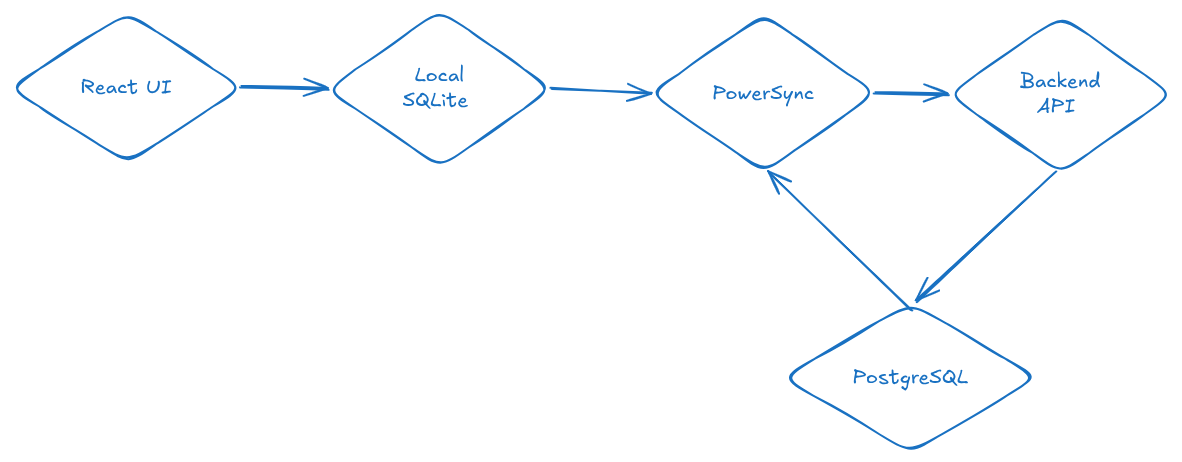
The flow became:
React UI -> Local SQLite -> PowerSync -> Backend -> PostgreSQLNow when the user hits save, the record lands in the local database first, the UI updates almost immediately, and PowerSync sends the change to the backend in the background.
click -> local write -> update UI -> sync in backgroundThe network still matters. It just no longer stands between the user and the interface.
That was the real shift. Not speeding up one query, but removing the network wait from the user's main interaction loop.
How it works inside
The frontend works with local SQLite through PowerSync. Components do not know about a separate API for every screen. They read through hooks or a DAL layer that runs SQL queries against the local database.
The backend changes roles too. It is no longer the layer returning JSON for every render. It becomes the place where permissions, constraints, relationships between entities, and incoming operations from the upload queue are checked.
PowerSync handles the synchronization layer. It delivers data to the client, keeps local SQLite in sync, and sends local changes back upstream.
We do not download the whole database
One of the first questions people ask is whether the whole database ends up on the user's device.
No.
A core part of PowerSync is partial replication. The client receives only the rows the user is allowed to access.
For example, if a user belongs to several workspaces, they get data only for those workspaces. Everything else never reaches the device.
A simplified `sync_rules.yaml`:
bucket_definitions:
  by_workspace:
    parameters: |
      SELECT workspace_id
      FROM workspace_memberships
      WHERE user_id = request.user_id()

    data:
      - SELECT * FROM records WHERE workspace_id = bucket.workspace_id
      - SELECT * FROM categories WHERE workspace_id = bucket.workspace_id
Extra data simply never gets synchronized. That gives you two big advantages.
First, the user never physically receives rows that belong to someone else.
Second, the backend and PostgreSQL are involved in far fewer routine reads. Lists, sorting, filters, and part of the analytics can all run locally.
For example, a list screen can open with a regular SQL query on the frontend:
SELECT *
FROM records
WHERE workspace_id = ?
ORDER BY created_at DESC
LIMIT 50;
If you need an index, that lives locally too:
CREATE INDEX records_workspace_created_at_idx
ON records (workspace_id, created_at);
This is a normal database sitting right next to the user. Not a just-in-case cache, but a real data source for the interface.
This is where the UI starts to feel faster. Opening a list no longer depends on a round trip to the server. A filter does not turn into another API call. Sorting does not wait for a database on the other side of the world. Analytics can run right on the device.
We did not do formal before-and-after benchmarks. In our case, the main problem was not that the backend responded too slowly. It was that the interface depended on network speed far too often.
To the user, this does not look like "we optimized a query." The product simply behaves differently: the screen appears right away, transitions feel calmer, and loaders disappear from places where they used to feel inevitable.
The backend and PostgreSQL still matter. They are involved in synchronization, initial loading, permission checks, and persistence. But a routine screen read no longer has to go through the API every single time.
A separate token for sync
We separated the app's normal authorization flow from access to the sync layer.
PowerSync uses a separate short-lived JWT. The client calls the regular API, the backend validates the user, and then issues a token specifically for sync.
class GetPowerSyncToken(APIView):
    permission_classes = [IsAuthenticated]

    def get(self, request):
        token = create_powersync_jwt(str(request.user.id))

        return Response({
            "token": token,
            "powersync_url": settings.POWERSYNC_URL,
        })
PowerSync checks the claims in that token and uses them when applying sync rules.
That split turned out to be convenient. The regular app session has its own lifecycle. Sync gets a separate short-lived pass.
Local mutations
The biggest shift on the frontend was that we stopped treating a save as an immediate POST to the backend.
The frontend updates the local database first.
await powerSync.writeTransaction(async (tx) => {
  await tx.execute(
    `INSERT INTO records (id, workspace_id, amount, created_at)
     VALUES (?, ?, ?, ?)`,
    [id, workspaceId, amount, createdAt]
  );

  await tx.execute(
    `UPDATE categories
        SET usage_count = COALESCE(usage_count, 0) + 1
      WHERE id = ?`,
    [categoryId]
  );
});
One local transaction can update several related entities.
The user does not have to wait for the server to confirm anything. They see the result immediately, while synchronization and validation catch up in the background.
Upload is a separate pipeline
Offline changes how people use the app.
The same record might be edited several times before the app gets a connection again.
update title
update amount
update category
update title again
If you send every intermediate state to the server, you create a lot of noise. In most cases, the backend needs the final version of the row, not the entire story of how the user got there.
So before upload, we compact the queue.
const transaction = await database.getNextCrudTransaction();
const byKey = new Map();

for (const item of transaction.crud || []) {
  const key = `${item.table}::${item.id}`;
  const previous = byKey.get(key);

  byKey.set(
    key,
    previous ? mergeOperations(previous, item) : item
  );
}

const batch = [...byKey.values()];

await postBatchWithRetries(uploadUrl, batch);
await transaction.complete();
We group operations by row and send only what actually needs to be applied on the server.
Less noise. Fewer duplicate operations. Fewer strange edge cases when the connection comes back.
The backend is still in charge
Local-first does not mean the frontend becomes trusted.
Yes, the user writes data locally first. Yes, the UI updates immediately. But the backend still validates every operation that arrives from the queue.
for index, operation in enumerate(batch):
    try:
        with transaction.atomic():
            action = operation["op"]
            table = operation["table"]
            row_id = operation["id"]
            data = operation.get("data", {})

            if action == "PUT":
                apply_put(table, row_id, data)
            elif action == "PATCH":
                apply_patch(table, row_id, data)
            elif action == "DELETE":
                apply_delete(table, row_id)
            else:
                raise ValidationError("Unsupported operation")

    except ValidationError as exc:
        errors.append({
            "index": index,
            "table": operation.get("table"),
            "id": operation.get("id"),
            "retryable": False,
            "detail": str(exc),
        })
Permissions, limits, entity relationships, field validation, all of that still lives on the server.
PowerSync helps move changes around. It should not become a way around business logic or security.
Cross-platform became simpler
Another practical upside is that the same code can be used across different platforms.
In our case, one approach works for web, PWA, Android TWA, and an iOS WebView wrapper. The shells are different, but the data logic stays shared.
Platform-specific details do not disappear. Storage, permissions, push notifications, background behavior, you still have to think about all of that, especially on mobile.
But the code itself does not have to be rewritten for every platform. Reads are local. Writes are local. Sync happens in the background.
For users, that feels much closer to a native app, even if there is still a web UI under the hood.
Minimal self-hosted deployment
You can run this architecture with Docker Compose.
At minimum, you need frontend, backend, PowerSync, and PostgreSQL.
services:
  frontend:
    build:
      context: ./frontend
    ports:
      - "4173:4173"

  backend:
    build:
      context: ./backend
    ports:
      - "8000:8000"

  powersync:
    build:
      context: ./powersync
    command: ["start", "-r", "unified"]
    ports:
      - "7001:7001"
    volumes:
      - ./powersync/config:/config

  postgres:
    image: postgres:16
    environment:
      POSTGRES_DB: app
      POSTGRES_USER: app
      POSTGRES_PASSWORD: change_me
A simplified PowerSync config:
replication:
  connections:
    - type: postgresql
      uri: !env PS_DATA_SOURCE_URI
      sslmode: disable

storage:
  type: postgresql
  uri: !env PS_STORAGE_PG_URI
  sslmode: disable

sync_rules:
  path: sync_rules.yaml

client_auth:
  jwks_uri: !env PS_JWKS_URL
  audience:
    - !env PS_AUDIENCE
`PS_DATA_SOURCE_URI` points to the main PostgreSQL database.
`PS_STORAGE_PG_URI` is used for PowerSync's own storage.
`PS_JWKS_URL` lets PowerSync validate JWTs.
The tradeoffs
Migrations. We didn’t want to write migration files for the frontend. It felt wrong, like maintaining a database on the client. So we took the lazy path: on schema change, wipe the local database and rebuild from sync. It works. But the first time a user opened the app after an update and stared at a loading screen while everything re-synced, we felt it. Not a crash, not a bug, just a bad moment that didn’t have to happen.
Conflicts. We had a real one. User A edited a record while offline. User B edited the same record online. The change landed on the server. User A came back online, upload queue fired, and quietly overwrote User B. Last Write Wins did exactly what it was supposed to do. That was the problem. Nobody lost data in a way the system could detect. It just disappeared.
The mental cost. The hardest part isn’t the code. It’s that you now have two databases to keep in sync, local and server, and when something looks wrong, you have no idea which one is lying. We’ve caught ourselves wanting to just add a normal API endpoint because it would be easier to reason about. Sometimes that instinct is right. Sometimes it’s just habit. Hard to tell in the moment.
Security. The local database sits on the user’s device. PowerSync handles access control through sync rules, and the backend validates every upload. But the surface area is larger than a classic API. Something to think about before you go local-first with sensitive data.
Was it worth it?
Honestly, the first two weeks after the switch were rough. Local state, upload queue, sync layer, server. Debugging something meant figuring out which of the four places was lying to you. We broke things. We fixed them. We broke them again in a different way.
But then it clicked.
And now, when I open Finsight on a shaky subway connection and the UI just reacts without a single loading spinner, I remember why we did it. The app finally feels light again, just like it did in the early MVP days, but now it’s built to scale.
Next time, I will write about how we added E2E encryption on top of this local database, so even we cannot see what users store.